

If you run customer service for an ecommerce brand, you’ll be accustomed to the most common Customer Service tickets that flood your inbox:
"Can I change the address on my order?"
"I meant to buy a medium, not a small."
"Do you have this in black instead?"
"I forgot to add my discount code."
You could recite these emails in your sleep. They land within minutes of checkout, they all want the same thing — change something before it ships — and every one of them costs an agent real time to open Shopify, find the order, make the edit, and reply. Multiply that by a few hundred orders a day and you've got a team whose job is basically data entry.
We spent time cataloguing exactly what customers ask for after they hit "buy," and it turns out the list is a lot longer than most support tools admit.
Here's every request we see, and what to do about each one.
The post-purchase requests customers actually send
Group them however you like, but in practice they fall into four buckets.
Shipping and delivery
- Change the shipping address (wrong apartment number, old address, typo)
- Upgrade the shipping method (they forgot they needed it faster)
- Add delivery instructions
Product changes
- Swap size or colour
- Replace one item for a different product entirely
- Add another product to the order
- Change the quantity of an item already in the cart
Payment and discounts
- Apply a discount code they forgot at checkout
- Switch the payment method
- Download an invoice or receipt for expensing/accounting
Order management
- Update contact information (the phone number their courier will actually call)
- Cancel the order — or, increasingly, get offered a faster fix before they go through with it
That's eleven distinct requests. Most post-purchase tools were built to handle two or three of these - usually address changes, because that's the safest one to automate. Everything else still becomes a ticket.
Most tools stop at "change my address." We don't.
Here's what it looks like when a customer opens their order confirmation with a “edit your order” button linking them to their Order Status Page with Order Editing installed.

Every request on that list above — address, size, colour, item swaps, quantities, shipping upgrades, payment method, contact details, discount codes, invoices, cancellations — is something the customer resolves themselves, on the order status pages, with zero help from your team. No ticket gets created. No agent has to touch Shopify. The customer gets what they wanted in under a minute. Subsequently creating the best form of customer service.
You decide how long that window stays open
The obvious worry: give customers free rein to edit orders and you'll end up with someone changing their address five minutes before the courier scans it, or "editing" an order that's already on a truck.
That's why the edit window is entirely yours to set. You can also build rules on top of the window itself: which items stay locked (final-sale SKUs, pre-orders), which orders qualify based on destination, value, or tags. The customer always sees exactly how much time they have left, so there's no confusion.
Cancellations don't have to be dead ends
Give a customer eleven ways to fix their order and some of them will panic click "cancel." That's not automatically a lost sale — half the time it's a customer solving the wrong problem, because cancel-and-reorder is the only option they can see.
Save the Sale, our newest addition, sits inside that same cancellation flow. Before anything cancels, we ask why: wrong size, changed their mind, found it cheaper elsewhere, ordered by mistake. The reason decides what happens next. Say "wrong size" and the customer sees a Replace button right there in the flow — same order, correct size, no need to cancel and place a new one. Every reason gets a save attempt matched to it, not a generic "wait, don't go" popup.
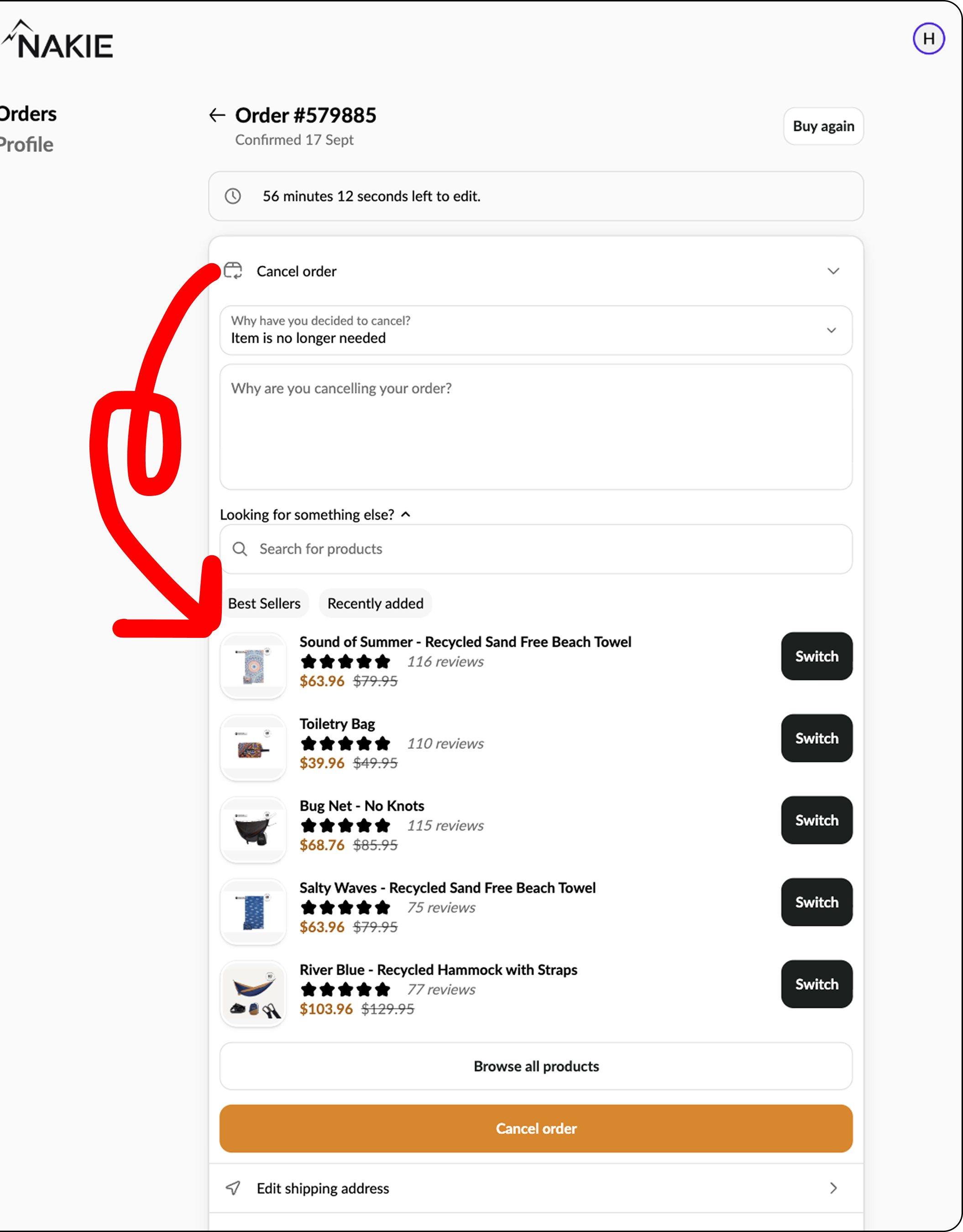
If the save doesn't land, cancellation still processes instantly and the customer gets a one-click link to re-order if they change their mind again later. On your side, every attempt is measured, so you can see exactly how much revenue the flow is recovering instead of guessing at it.
It's the same idea behind everything else in this article: give the customer the fastest path to what they actually want. Most of the time that's an edit. Now, even when they've already clicked "cancel," it still might be.
What this actually does to a support queue
We could tell you this works. It's more useful to show you brands where it already has.
Oh Polly: 98% fewer order-change tickets
Oh Polly was fielding around 2,000 order-modification requests a month — address changes, forgotten discount codes, shipping upgrades — each one taking four to six minutes for an agent to resolve. After rolling out Order Editing with a 15-minute self-serve window, order-change tickets dropped 98%, customer contacts fell 85% in the first month, and the team saved over 200 hours in that same period. A few months in, total support ticket volume was down 20% overall.
"It takes four to six minutes to resolve these tickets, so Order Editing immediately saved us about 200 hours."
— Gemma Mander, Operations Support Coordinator, Oh Polly
Read the full Oh Polly case study →
Scandiborn: tickets cut in half, and a new revenue line
Scandiborn was growing fast enough that customer service headcount looked like it would have to grow right alongside it — every extra thousand orders meant more address corrections, forgotten items, and delivery changes. Order Editing cut support tickets 50% year-over-year, and customers used the same self-serve moment to add items to their own orders, generating over £30,500 in upsell revenue and roughly £1,500 a month in ongoing post-purchase sales.
"My favourite thing about Order Editing is the fact that we're a growing business, but I know that I'm not going to need to grow our customer service team anytime soon."
— Laura Davies, CEO, Scandiborn
Read the full Scandiborn case study →
Ridge: 80% of order tickets gone, $1M+ in incremental revenue
Ridge's support team was stuck in a bottleneck familiar to any brand that scales seasonally: only a handful of agents had permission to edit orders, each edit meant switching between the helpdesk and Shopify, and Shop Pay's saved-checkout convenience kept sending accidental shipping errors straight into the queue. Order Editing redirected 80% of order-related tickets away from support entirely, with customers now completing around 5,000 self-serve edits a month — a number expected to double in Q4. The order status page also became a genuine revenue channel, driving over $1M in incremental annual revenue.
"What's great with Order Editing is that the customer can just jump right in, fix the issue, and skip all the drama."
— Will Moran, Ridge
Read the full Ridge case study →
The pattern across all three
None of these brands solved this by hiring more agents or writing longer macros. They solved it by moving the decision to the person who actually knows the answer — the customer — and giving them a safe, time-boxed window to make it themselves. Fewer tickets, faster resolutions, and in Scandiborn's and Ridge's case, a new revenue line that didn't exist before.