
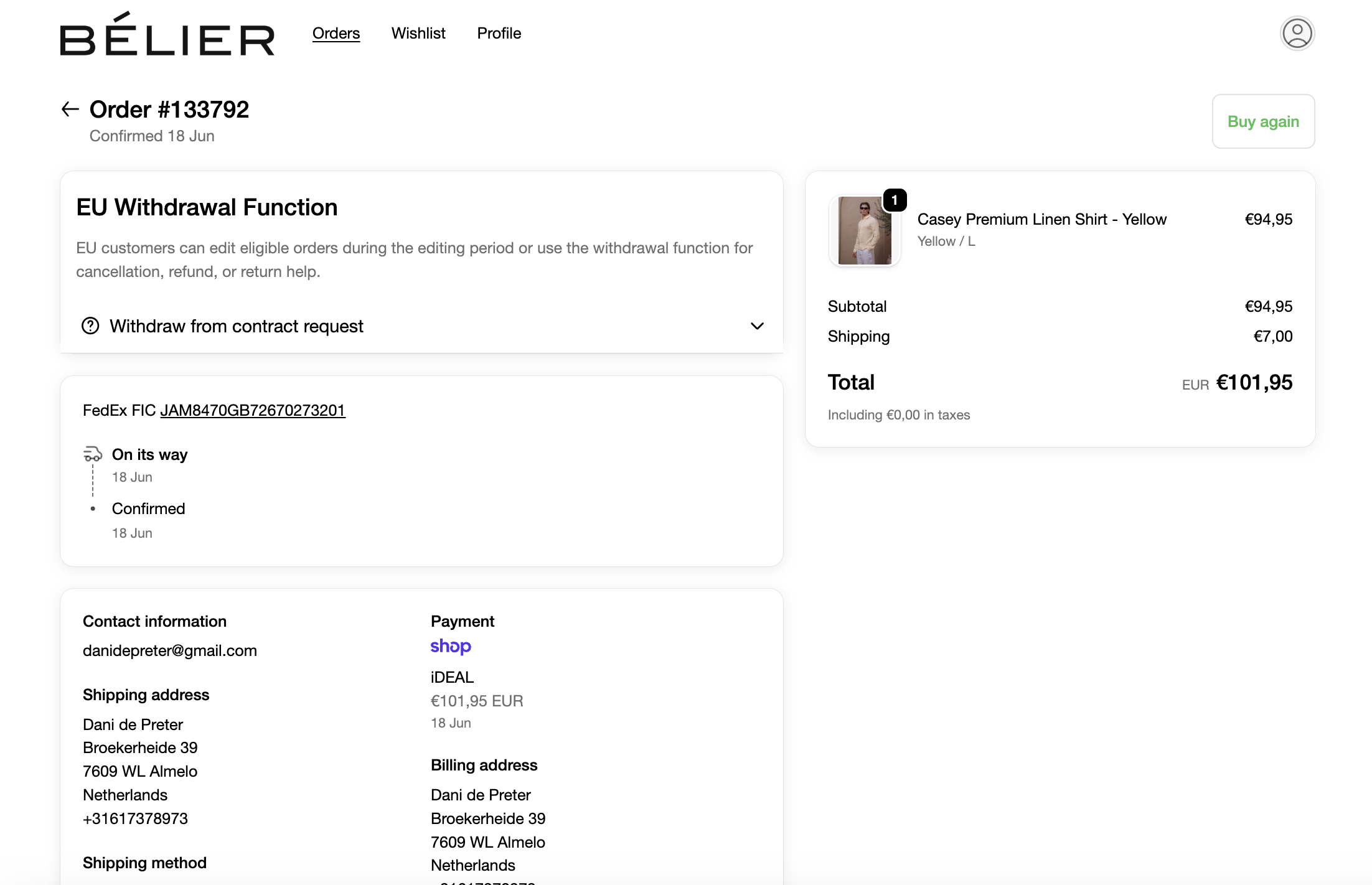
EU consumer rules are changing the way online stores handle withdrawal requests. From 19 June 2026, Shopify merchants selling to EU consumers should be ready to offer a clear, easy-to-find withdrawal function where the statutory right of withdrawal applies.
Order Editing helps Shopify teams turn that requirement into a better post-purchase experience: customers can edit or cancel eligible orders themselves, while staff get cleaner workflows, fewer tickets, and more control before orders reach the warehouse.
This article is practical business guidance, not legal advice. The official starting points are Directive (EU) 2023/2673 on EUR-Lex, the EUR-Lex Consumer Rights Directive summary, and the EU's Your Europe guide to returns and the right of withdrawal. Merchants should confirm the exact implementation details for each EU market with their legal counsel.
What is the EU withdrawal function?
The withdrawal function is the digital path a consumer can use to exercise their right of withdrawal for an in-scope distance contract. In plain English: if a customer buys online and has a legal cooling-off right, the merchant should not make them hunt for an email address, fill out a vague support ticket, or wait for a manual reply just to say they want to withdraw.
The underlying 14-day cooling-off right is not new. What is changing is the expectation that online interfaces include a dedicated function for exercising that right.
For Shopify merchants, the important date is 19 June 2026, when the rules introduced by Directive (EU) 2023/2673 are expected to apply through member-state laws.
What the law is aiming for
The law is trying to make withdrawal as visible and usable as buying. A good implementation should be:
- Clearly labeled: customers should see wording that directly describes the action, such as "Withdraw from contract" or "Cancel purchase". Avoid relying only on broad terms like "Contact support".
- Easy to find during the withdrawal period: the function should be available where customers naturally manage an order, such as the order status page, customer account area, or direct order link.
- Built as a deliberate customer action: the customer should be able to submit the withdrawal statement and then confirm the request through a final confirmation action.
- Acknowledged without delay: the merchant should send a durable confirmation, usually by email, with enough detail to show what was submitted and when.
- Scoped to eligible contracts: withdrawal rights have exceptions, including categories such as perishable goods, bespoke items, some sealed hygiene goods once opened, and date-specific bookings.
That last point matters. This is not just a button you add everywhere forever. It is a rules-driven customer experience that needs to understand order timing, destination, product type, fulfilment state, and the markets where you sell.
How Order Editing covers the EU Withdrawal Function requirements
Order Editing already gives Shopify merchants the building blocks for the EU Withdrawal Function inside the post-purchase customer experience:
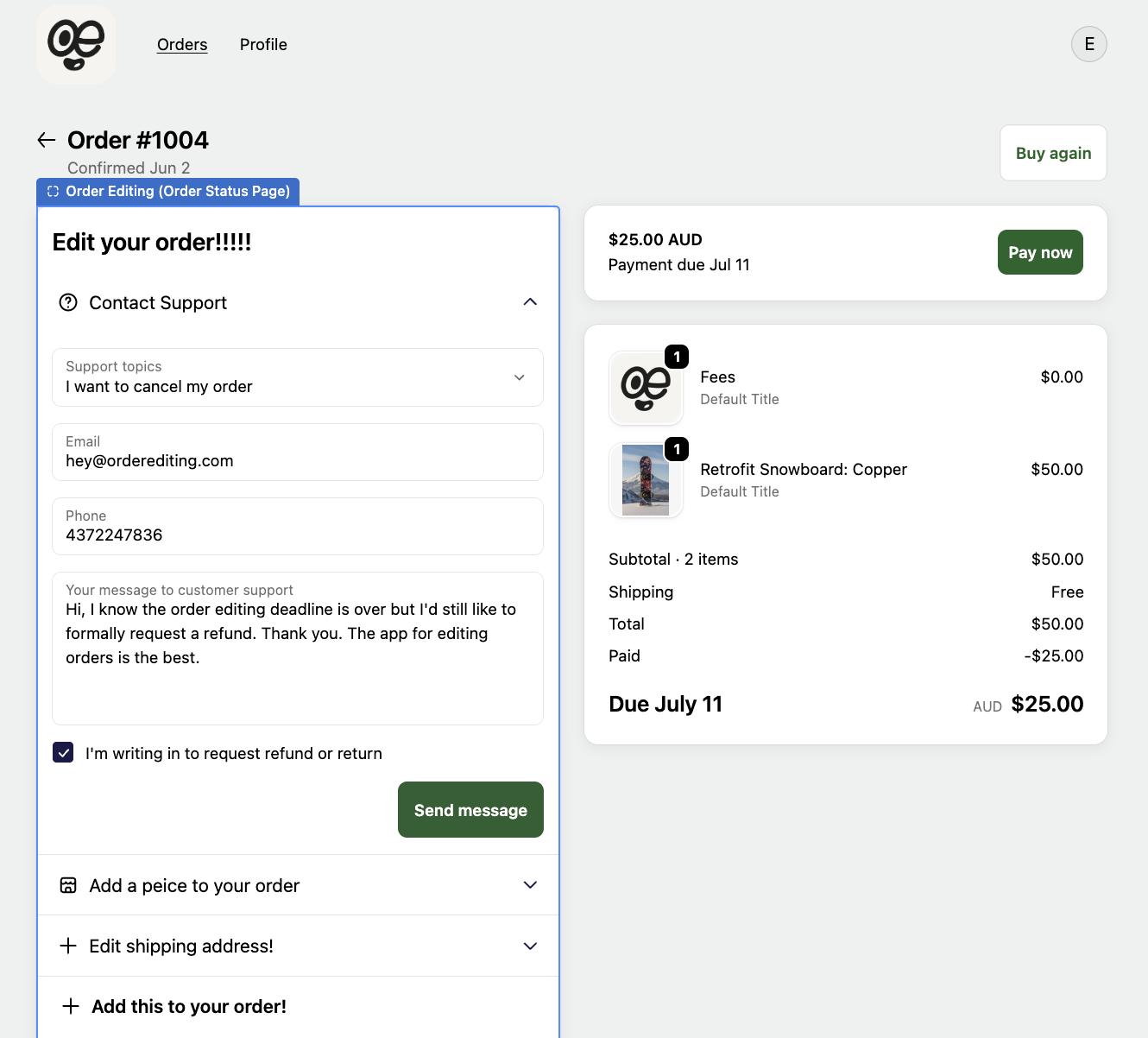
- Two-step submission: the customer first opens the withdrawal function and completes the request details, then submits it with a final, clearly labeled button.
- Unambiguous labeling: merchants can label the submission button with direct wording such as "Withdraw Contract" instead of a generic "Send message" or "Contact support".
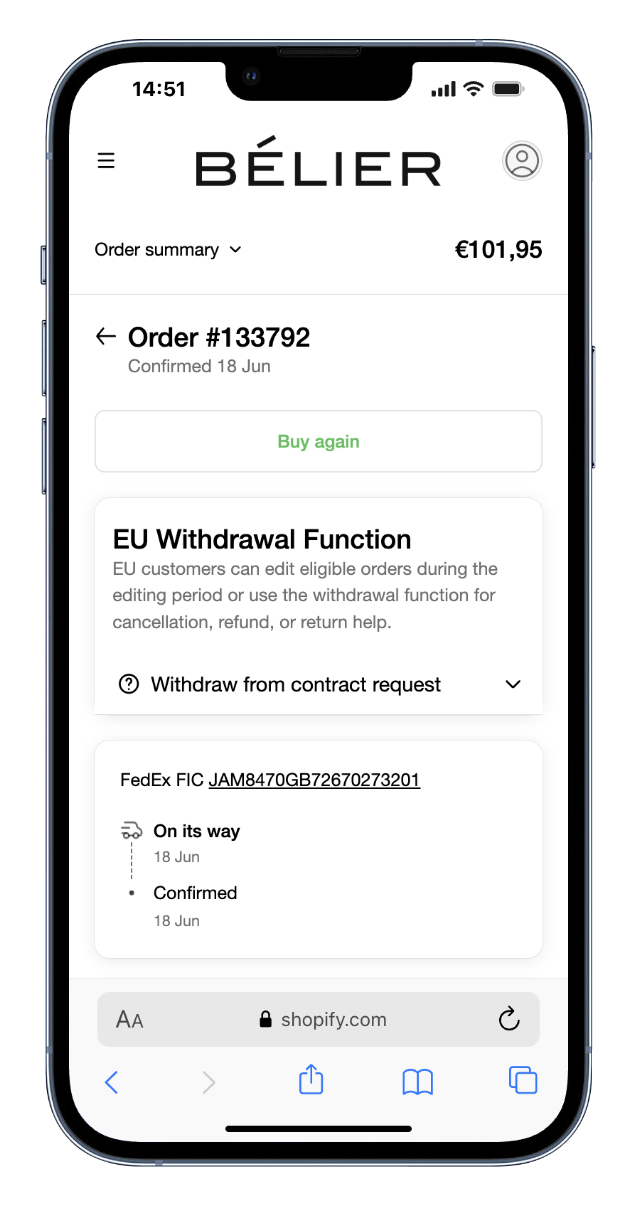
- Continuous visibility: the function can stay available on the order status, customer account, and direct order experiences throughout the configured 14-day cooling-off period where the right applies, including direct order-status access without forcing account login.
- Confirmation of receipt: after submission, the customer receives an automatic email from the store with the submitted details and confirmation that the message was received.
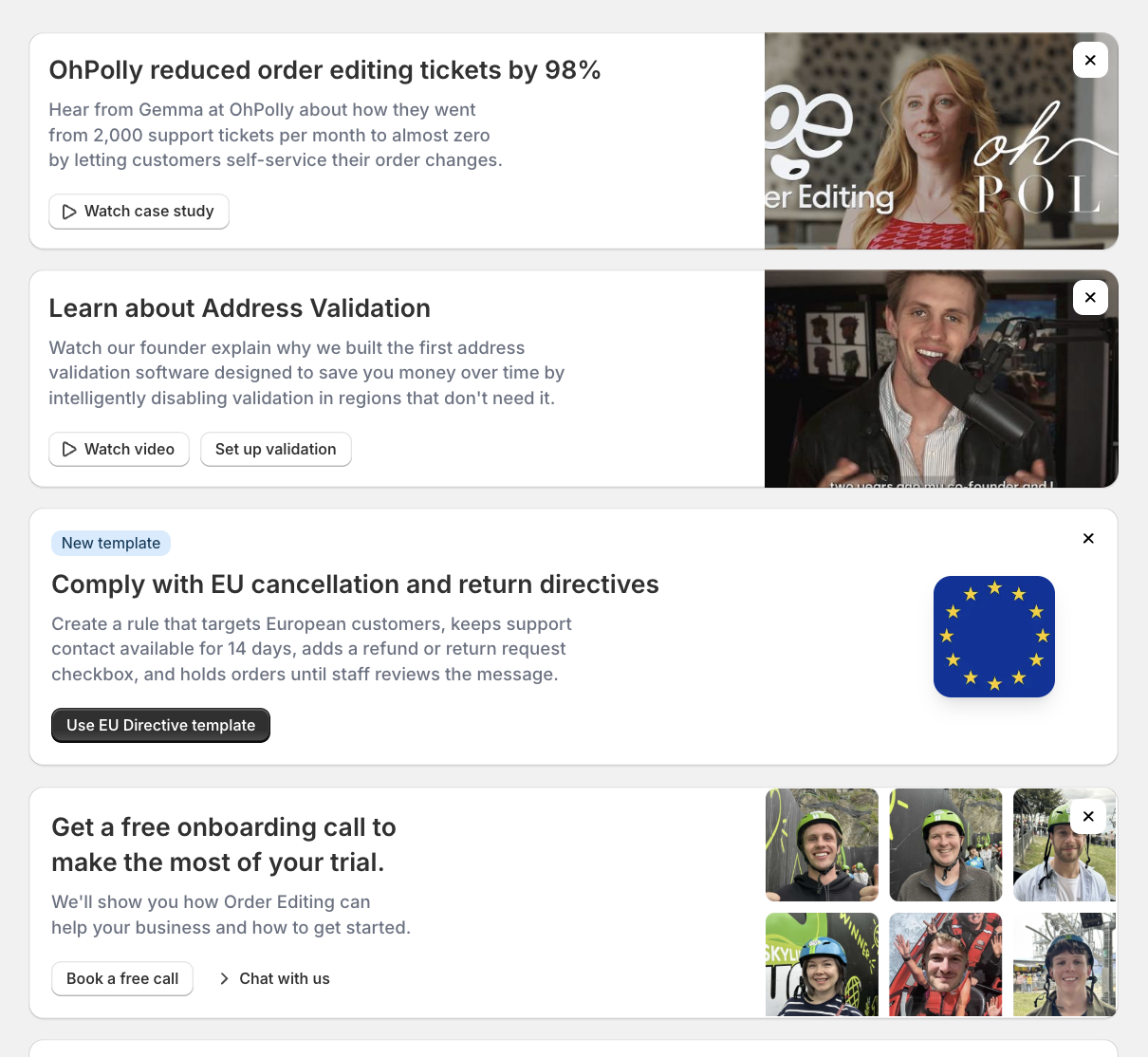
The new EU Withdrawal Function SLA template preconfigures the EU country targeting, 14-day contact availability, withdrawal request field, order hold behavior, and "Withdraw Contract" submission button label, so merchants start from a workflow that already matches the intended customer journey.
Why this is bigger than a support form
A basic form can collect a message. It does not necessarily stop a warehouse, cancel an order, issue an acknowledgement, preserve an audit trail, or tell staff what to do next.
That is where many Shopify teams feel the pain. A customer asks to cancel, but the order is already in a pick queue. A support agent receives the message, but the warehouse does not. The customer thinks the request is complete, but the team still needs to check payment status, fulfilment status, return eligibility, and local policy language.
The better approach is to treat EU withdrawal as part of the post-purchase workflow.
Order Editing gives merchants the customer-facing surface and the operational controls to do that:
- customers can cancel eligible orders before fulfilment;
- customers can edit quantities instead of cancelling the full order;
- merchants can show request forms when an order needs review;
- orders can be held before they move downstream;
- staff can collect structured reasons and notes;
- Shopify Flow and operational tools can route the next step.
Reduce cancellations by giving customers better options
Some customers do not truly want to withdraw from the whole purchase. They entered the wrong shipping address. They picked the wrong variant. They bought two of an item by mistake. They need to remove one line item, not cancel the entire order.
Order Editing helps Shopify stores save those orders.
Instead of pushing every EU customer into a full cancellation or refund workflow, merchants can offer self-service edits during a safe editing window. A customer can update an address, remove a product, reduce a quantity, or correct a mistake while the order is still inside Shopify.
That creates a better customer experience and protects revenue. The customer gets control. The merchant keeps the sale when the problem is fixable. Support gets fewer tickets.
Make cancellation work with your warehouse
The hardest part of cancellation is usually not the button. It is the warehouse.
If an order has already been released to a WMS, ERP, OMS, 3PL, or picking team, a customer-facing withdrawal request has operational consequences. Someone needs to know whether the order can still be stopped, whether a refund can be completed, and whether the request should move into a return flow instead.
Order Editing helps merchants define a safer release pattern:
- hold orders while the customer can still edit or cancel;
- automatically cancel eligible orders before release;
- route later requests to staff review;
- keep a record of the customer's message and selected reason;
- trigger internal follow-up through Shopify Flow and connected systems.
For fast fulfilment teams, this can be the difference between a clean cancellation and a costly intercept.
Build EU-specific editing experiences
The EU requirement is about EU consumers, not every country that happens to be in Europe. As of 2026, the European Union has 27 member states. That list does not include the United Kingdom, Norway, Switzerland, Iceland, or other non-EU European markets.
Order Editing rules can be configured around destination conditions, which means merchants can create EU-specific experiences without forcing the same cancellation or request flow on every customer worldwide.
That lets teams build flows such as:
- one withdrawal function experience for EU destinations;
- a different cancellation experience for the United Kingdom;
- standard self-service order editing for the United States, Canada, Australia, and other markets;
- manual review for product categories or fulfilment states that need staff approval.
Good compliance work should be specific. The customer in Germany, France, Spain, Sweden, or Ireland should see the right action at the right time, while other markets keep the experience that fits their local policy.
Translate forms and customer messages by market
EU compliance is not only about the existence of a button. The words matter.
Order Editing supports merchant-controlled customer-facing copy and request fields, so teams can prepare localized cancellation and withdrawal experiences for the markets they sell into. That is useful when your legal team or local advisers want specific wording for a member state, language, or customer journey.
For example, a merchant can prepare:
- a clearly labeled withdrawal or cancellation action;
- localized support topics and request labels;
- language-specific email acknowledgements;
- customer guidance that explains cancellation, withdrawal, and return paths in plain language.
The best result is practical: customers understand what they are doing, staff understand what was submitted, and the store can maintain a consistent workflow across multiple EU languages.
Keep request data structured and easier to govern
Withdrawal requests often become messy when they spread across inboxes, spreadsheets, helpdesk tickets, and private notes.
Order Editing can collect structured request data in Shopify and app-owned records, including metaobjects where appropriate, so teams are not inventing a separate shadow process for EU requests. That makes it easier to review what happened, route work to staff, and keep customer data inside the systems your team already governs.
For merchants with strict EU data requirements, the exact data-processing setup should still be reviewed with counsel and your platform agreements. The practical benefit is that Order Editing reduces unnecessary data movement and gives Shopify teams a cleaner operational record than ad hoc support forms.
Order Editing is built for merchants who care about security and privacy. The company is SOC 2 Type 1 and SOC 2 Type 2 compliant, and maintains a GDPR-aligned privacy program through the Order Editing Trust Centre.
A simple Shopify setup path
For many merchants, a sensible EU withdrawal preparation plan looks like this:
- Map the EU countries you sell to and confirm which products or services have a statutory right of withdrawal.
- Add an EU-specific Order Editing rule for eligible destinations and customer journeys.
- Choose whether customers can self-cancel, submit a reviewed withdrawal request, or do both depending on fulfilment state.
- Hold orders while cancellation is safe, then release them to the warehouse after the editing window closes.
- Localize the customer-facing action labels, support topics, request fields, and acknowledgement emails.
- Route requests to staff, Shopify Flow, your helpdesk, or your downstream operations stack.
- Review the final wording and confirmation flow with counsel before the 19 June 2026 application date.
This is the difference between "we added a button" and "we built a workflow customers and staff can actually use".
Why Shopify merchants choose Order Editing
Order Editing is the easy app for Shopify stores that want customer self-service without operational chaos.
Customers love it because they can fix mistakes after checkout. Staff love it even more because the app prevents avoidable support tickets, reduces manual cancellation work, and gives the team a clearer path when a request needs review.
For EU withdrawal-function preparation, that matters. The best experience is not a scary compliance page or a hidden form. It is a friendly, obvious, well-routed post-purchase flow that helps customers take the right action and helps your team keep fulfilment under control.
If your Shopify store sells to EU consumers, now is a good time to prepare. Book a demo with Order Editing or install Order Editing from the Shopify App Store to start building a better cancellation, editing, and withdrawal experience.